
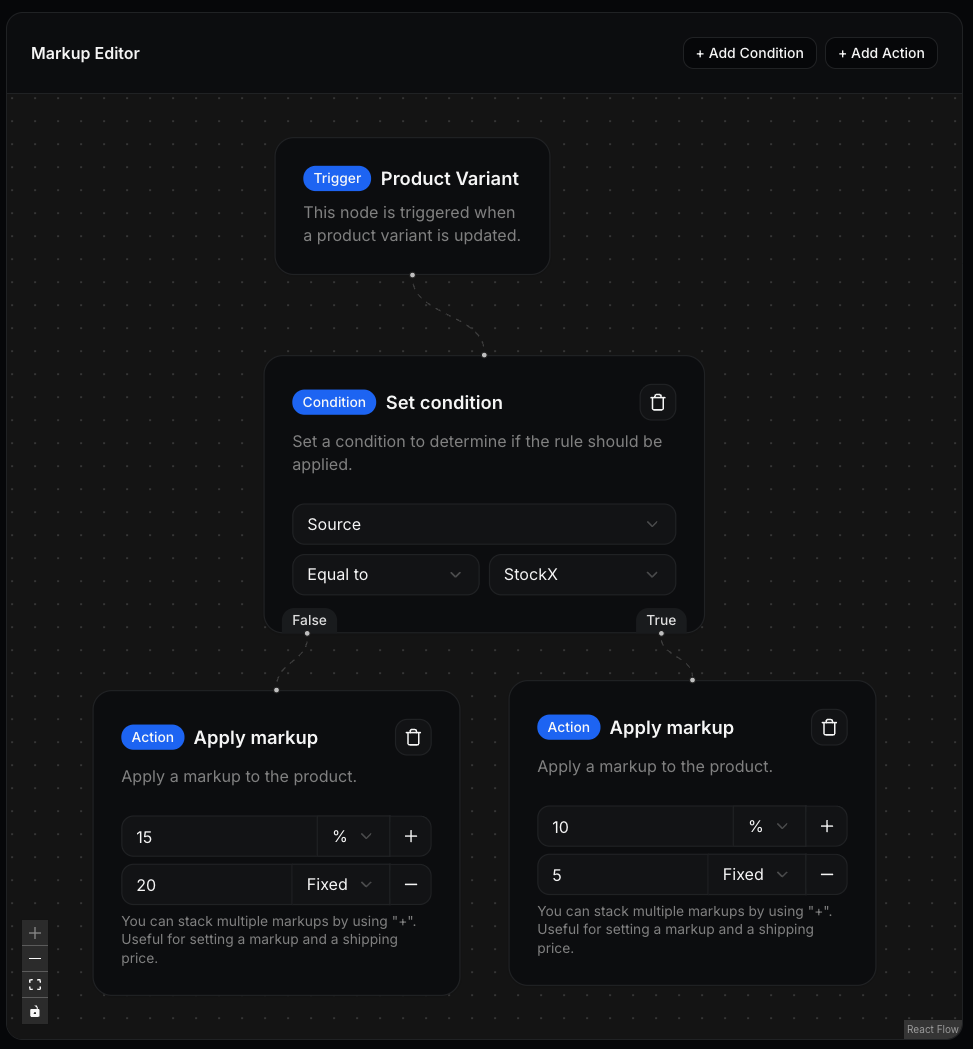
Node types
Trigger
The entry point of every markup rule. Each rule has exactly one trigger node, and it cannot be deleted.Condition
Filters that control when a markup applies. Conditions can be stacked — all must be met for the flow to continue. You can filter on:Action
Applies a markup on top of the base price. Multiple actions can be stacked — for example, combining a percentage margin with a fixed amount to cover shipping.Applying a markup rule
Markup rules can be assigned at two levels: Store level — Set a default rule in your store settings. This applies automatically to any new products created on that store. Existing products are not affected. Product level — Override the rule for a specific product by editing it directly. This takes precedence over the store-level default.If you update a store’s default rule, existing products will keep their
current rule. To update them, reassign the rule on each product individually.